


House of Blackjack 21
4.16.24K Reviews
App Specs
- Version
- 1.12.1
- Updated On
- License
- Free
- Downloads
- 1,000,000+
- Developer
- MASSIVE GAMING PTY LTD
- Categories
- Card
- Platform
- Android
Screenshots




 Analysis by AppCompare
I tend to judge a phone-based blackjack game by how easily I can settle into a hand without fighting the screen or feeling pushed to spend. House of Blackjack 21 is a free card game from MASSIVE GAMING PTY LTD, built around casino-style blackjack and social play. It has an average rating of 4.1 from around 26,000 ratings, and more than a million installs. That reach makes it worth a look, but the more useful question is whether its presentation and pace suit the way you like to play.
The Casino Experience on Your Phone
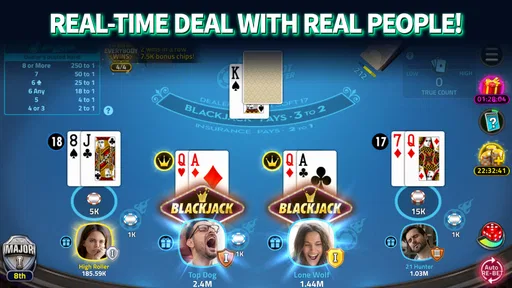
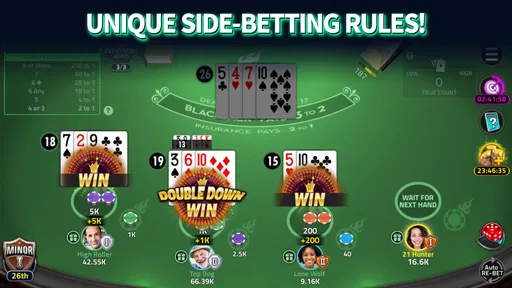
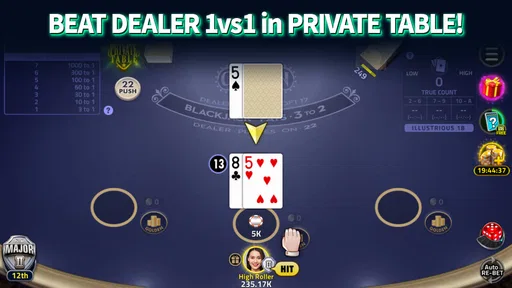
When I first opened House of Blackjack 21, I was immediately struck by its sleek design. The developers have done a stellar job replicating the ambiance of a real casino. The graphics are crisp, and the sound effects make you feel like you're sitting at a blackjack table in Vegas. It’s not just about playing cards; it's about the experience, and this app nails it.
Readability, Navigation, and Settling In
The user interface is intuitive and easy to navigate. I had no trouble finding my way around the different game modes and settings. The app runs smoothly, with no noticeable lag or glitches during my playtime, which is crucial during intense games where timing matters.
Another cool feature is the customization options for the tables and cards. You can personalize your gaming experience to suit your style. It's a nice touch that adds to the overall enjoyment of the game.
In practical terms, the most helpful test is whether you can find a table and understand the current hand without pausing to search through menus. If you are new to blackjack, give yourself a quiet first session to inspect the screen and learn where the important choices appear. That small bit of orientation can make a more social match less stressful, because you are not trying to learn the layout while other players are waiting.
Table and card customization is also more than decoration if a particular visual arrangement is easier for you to follow. I would try the available choices before settling into longer sessions rather than assuming the default is the clearest. A design that looks attractive at a glance is not automatically the one that makes suits, values, and action prompts easiest to distinguish on your own phone.
Motor and Sensory Considerations
Blackjack is a turn-based card game, so it does not demand the rapid aiming or continuous movement found in many action games. That makes it a more relaxed option when I want to think through a decision at my own pace. Still, decisions happen in sequence, and an online table may involve other people waiting. If you need more time to read the screen or make a selection, a solo or low-pressure session is a better place to get comfortable than a competitive match.
Worth Reading Before You Choose

EA SPORTS FC Mobile 26 Is a Bigger Football Game, but It Takes Time

Flipboard Shows What News Apps Must Do Beyond the Feed

Switching to Android Auto Means Rethinking Your Driving Routine

Google Calendar Makes a Crowded Week Easier to Manage

Ludo King Makes the Most of the Minutes Between Plans

Baby Panda World Brings Quick Play to Modern Phones, but Its Game Library Feels Busy
Sound effects contribute to the casino atmosphere, but they are not essential to understanding the basic idea of a hand. If audio is distracting in a shared room, or you are playing somewhere quiet, check the in-game settings and your device controls before starting. I would not rely on sound alone for important information; keeping the screen in view is the safer way to follow the action.
For players who experience visual fatigue, a long session can be less comfortable than a few short rounds, especially on a small display. I would increase the phone’s text size or display scale if that helps with general screen reading, then check whether the game still fits comfortably. That is a device-level adjustment, not a guarantee that every game element will resize perfectly.
Gameplay, Learning, and Social Pace
The game offers a variety of modes, which I found quite entertaining. Whether you're a newbie or a seasoned pro, there's something for everyone. You can start with the basic tables and work your way up to high-stakes games. Playing online with friends or random opponents adds an exciting social element. And trust me, the competitive spirit kicks in fast!
One feature that stands out is the tutorial mode. For those who might not be familiar with the intricacies of blackjack, this mode is a lifesaver. It walks you through the rules and strategies, ensuring you don’t feel lost when you hit the tables. I found it very helpful, especially when trying to refine my strategy.
My practical advice is to treat the tutorial as a low-stakes orientation, not as a promise that every table will feel identical. Learn the basic flow first, then move to a social table once the decisions feel familiar. If you are introducing a friend to blackjack, it can be easier to explore the rules separately and then join the same table, rather than explaining each choice while a hand is in progress.
That social option is the main distinction from a straightforward solo card game. A conventional single-player blackjack app is usually better when you want an uninterrupted practice session and control over the pace. Here, friends or other players can make a round feel more like shared downtime, but that same social pace is a drawback if you prefer to stop and think without anyone else waiting.
Situational Access and Everyday Use
This game makes the most sense in short pockets of free time when you can look at the screen and stay present for a hand. A realistic use case is waiting for a friend at a café: I could open a few rounds, then put the phone away when they arrive. It is less suited to playing while walking, watching a child, or splitting attention between a conversation and the table, since missing a decision can spoil the flow for you and your opponents.
If you are playing with a friend, agree on whether you want a relaxed catch-up or a competitive session before choosing where to play. That simple expectation-setting avoids turning a casual game into pressure to keep up. For random opponents, I would choose a time and place where you can focus long enough to finish a hand rather than starting one during a brief interruption.
It is also worth thinking about the setting around you. Casino-style sounds and a bright screen may be unwelcome on public transport or in a quiet waiting room, so use device controls and keep the display discreet. The app’s Teen age rating is another reason to consider whether it fits the people nearby and the family rules for the device; a casino theme may not be every household’s idea of suitable entertainment.
Chips, Purchases, and Keeping Play in Perspective
Like many free-to-play games, this app does come with in-app purchases. You start with a decent amount of chips, but as you progress, you might feel the need to buy more, especially if you're on a losing streak. The app is pretty generous with daily bonuses and rewards, though, which helps keep the game enjoyable without constantly reaching for your wallet.
However, if you’re competitive like me, it can be tempting to invest in some extra chips to keep your streak going. The pricing is reasonable, and they often have deals that make the purchases worthwhile.
I would be more cautious about buying chips than that enthusiasm suggests. In-app purchases range from $0.99 to $199.99 per item, so the upper end is a meaningful commitment for a casual card game. Before spending, decide on a limit outside the excitement of a losing streak, and check the purchase confirmation carefully. If you are playing mainly to learn blackjack or pass a few minutes, I would first see whether the free play and any rewards are enough for your routine.
A useful way to avoid letting chips dictate the session is to set a stopping point before you begin: for example, stop after a fixed number of rounds or when you no longer feel relaxed. That is a personal play habit, not an in-game feature, but it keeps the focus on entertainment rather than chasing a recovery. Anyone who finds casino-style wagering cues uncomfortable should skip this game, even if the play is on a phone and the theme feels light.
Remaining Barriers and Who May Prefer Another Game
There are limits to how inclusive a phone card table can feel. The screen is compact, visual information remains central, and social play can add time pressure. Customization may help some players find a more comfortable presentation, but it does not necessarily address every need. If you depend on a specific assistive setup, test a short session before investing time or money, and stop if the controls or visual layout are difficult to use.
I would also choose a different kind of blackjack app if my priority were a completely private, quiet practice environment, or if I wanted a game with no purchase prompts and no competitive social element. Conversely, someone who enjoys talking with friends around a familiar card game may find that the online format is the point, not a distraction. The right choice depends less on whether you already know blackjack and more on whether you want company, a casino-like mood, or a calm solo exercise.
The game is free to download, but its optional purchases mean “free” does not necessarily describe every way to keep playing. It is rated Teen, runs on Android 6.0 or later, and its current version is 1.11.13. Those details make it easier to decide whether an older Android device can run it and whether the game suits your household. It was released on February 6, 2018, and has accumulated around 6,200 written reviews, alongside its broader rating count.
Community and Support
One of the things I appreciate about the game is its active community. The app has a vibrant social aspect, with chat options and leaderboards that keep you engaged. Competing against players worldwide really adds to the thrill.
If you ever run into issues or have questions, the support team is quick and responsive. There's an FAQ section that covers most common queries, but their customer support is readily available if you need more help. It's always reassuring to know there's someone to assist you when needed.
For a new player, the community is most useful when it adds company without becoming the main reason to stay in a session. I would mute or step away from chat if it makes the game harder to follow, and I would avoid sharing personal details with strangers. Leaderboards can make progress feel visible, but they are not a good measure of whether you are learning well or enjoying yourself; a calmer personal goal, such as understanding the choices in each hand, is often more rewarding.
My Inclusive Verdict
In conclusion, House of Blackjack 21 offers an immersive and enjoyable blackjack experience. Whether you're looking to pass some time or hone your card-playing skills, this app delivers. The combination of realistic graphics, a variety of game modes, and a strong community makes it a must-try for any blackjack enthusiast.
I would recommend it most to people who already enjoy blackjack, want to play socially, and are comfortable with a casino theme and optional spending. Beginners can use the tutorial to get oriented, while experienced players may appreciate the quick access to a table and the chance to play with friends. It is less compelling for someone who wants a purely private practice tool, needs a very unhurried interface, or would rather avoid chips and purchase choices altogether.
So, if you’re ready to hit the tables and test your luck, give it a try with a clear spending limit and a comfortable setting. I promise you, it’s going to be a wild ride!
Pros
- User-friendly interface for beginners.
- Realistic graphics enhance gameplay.
- Variety of game modes available.
- Offline play without internet needed.
- Regular updates with new features.
Cons
- Contains ads that can be intrusive.
- In-app purchases can be expensive.
- Limited customization options.
- Requires frequent updates for bug fixes.
- Occasional connectivity issues online.
FAQs for House of Blackjack 21
What are the main features of House of Blackjack 21?
House of Blackjack 21 offers a realistic casino experience with high-quality graphics and smooth gameplay. It includes various modes such as Classic Blackjack, Tournament Mode, and Multiplayer. Players can also enjoy daily challenges and earn rewards. Additionally, the game features customizable tables and cards to enhance the gaming experience.
Is House of Blackjack 21 free to play?
Yes, House of Blackjack 21 is free to download and play. However, it offers in-app purchases for players who wish to enhance their gameplay experience with additional chips, special items, or premium features. While purchases can enhance the game, they are not necessary to enjoy the core experience.
Does House of Blackjack 21 require an internet connection?
House of Blackjack 21 can be played both online and offline. While an internet connection is required for multiplayer and tournament modes, players can enjoy the classic single-player mode without being connected to the internet. This flexibility allows players to enjoy the game anytime, anywhere.
Are there any age restrictions for playing House of Blackjack 21?
Yes, House of Blackjack 21 is intended for adult audiences, typically 17 years of age and older, due to its simulated gambling content. It is important for players to adhere to these age restrictions to ensure responsible gaming practices. Parents should also monitor their children's access to such games.
How can players ensure their progress is saved in House of Blackjack 21?
To ensure progress is saved, players should connect the game to their social media accounts or use cloud-saving features if available. This allows for easy recovery of game data in case of device changes or reinstallations. Always check the settings menu for options related to saving progress securely.


